


community
Public Groups, Stickers, GIFs and Translate: Messaging in StepsApp Just Got Better
Find public groups and challenges to join, then chat with stickers, GIFs, replies and one-tap translation. Here's what's new in StepsApp messaging.

By Andreas Dolinsek, CTO at StepsApp
Walking alone is fine. Walking with people who push you, cheer for you and tease you when you fall behind is better.
That’s why this update is all about the people part of StepsApp. You can now discover public groups and challenges and join them with one tap. And once you’re in, chatting got a lot more fun: stickers, GIFs, replies and translation are here.
Why we built it
Groups and challenges have always been the most motivating part of StepsApp. The numbers are clear: people who walk with others walk more, and they stick with it longer.
But there was a catch. To join a group, you needed an invite. If your friends and family weren’t on StepsApp yet, you were on your own.
At the same time, the chat inside groups was pretty basic. Text only. No way to answer a specific message. And in international groups, half the messages were in a language you might not read.
So we fixed both.
Public groups and challenges
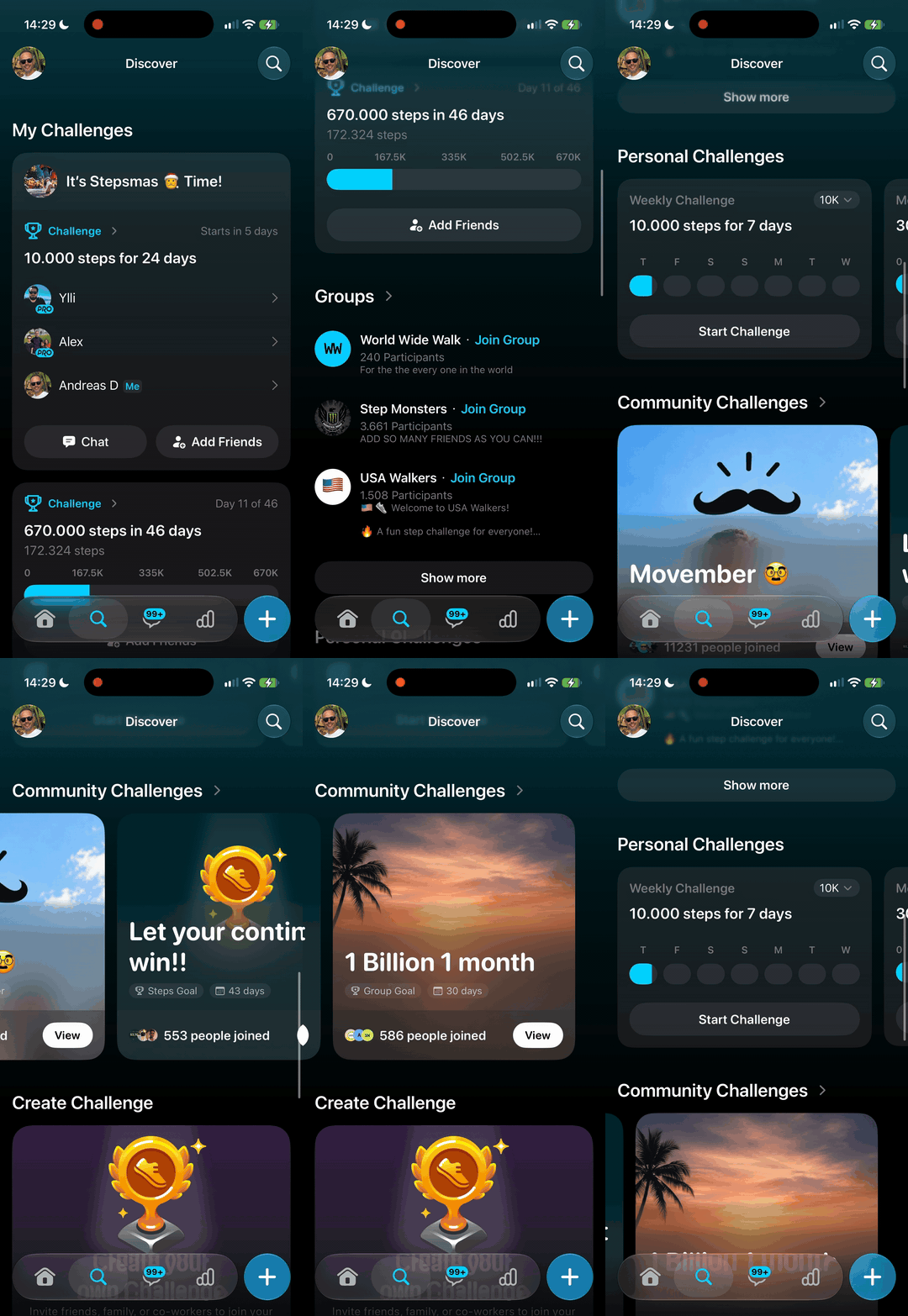
Group and challenge creators can now make them public. Public groups and challenges show up in the new Discover tab, so anyone can find them and join with one tap on Join Group.
Discover puts everything in one place: your running challenges, public groups like World Wide Walk or Step Monsters, quick personal challenges, and big community challenges like Movember, where more than 11,000 people walk together. Groups and challenges from your region show up first. Pick one and you’re in.
You can also browse them on our website: the current public groups and challenges are listed on steps.app/discover. Tap a card and it opens straight in the app.
Running your own group and want to keep it private? No problem. Private stays the default. Only groups and challenges you explicitly make public appear in Discover.
And since public means strangers can join, the same community rules apply everywhere. Be kind, no spam, and you can report anything that crosses the line.
Stickers and GIFs
Sometimes “great job” just doesn’t cut it. When someone in your group crushes 25,000 steps on a rainy Sunday, they deserve a dancing cat.
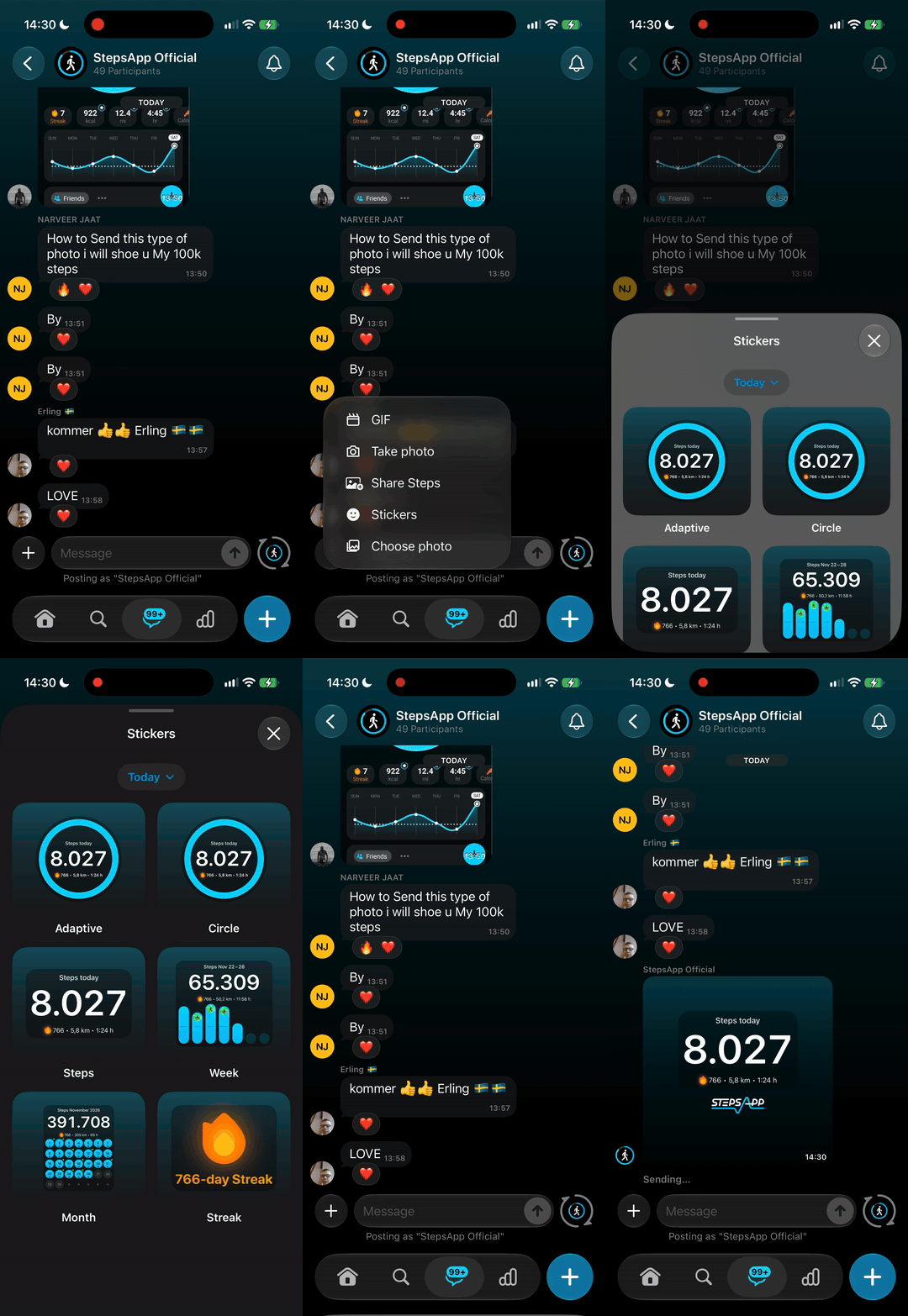
Tap the + next to the message field and you’ll find GIFs and Stickers, right next to photos and Share Steps.
GIFs come with a search and quick categories like Hello, Lol and Love. Find the right one, tap, sent.

And the stickers are very StepsApp: they’re made from your own steps. Today’s steps as a ring or a big number, your week as a bar chart, your whole month as a calendar, or your streak as a glowing flame. So instead of typing “I did 8,000 steps today”, you just show it 🎉
Reply to a message
Busy groups get messy fast. Someone asks “who’s in for a walk tomorrow at 7?” and ten messages later nobody knows what “yes!” was an answer to.
With Reply, you can answer a specific message. The original shows up above your answer, so the context is always clear. Just long-press a message and choose Reply. The same menu also lets you react with an emoji, copy a message or report it.
Translate with one tap
This is the one I’m personally most excited about.
StepsApp is used all over the world, and public groups make that very visible. A challenge can easily have members from Austria, Japan, Brazil and the US. That’s great, until everyone writes in their own language.
Now you can translate any message into your language. Long-press the message, choose Translate, and you can read it right away. Everyone can keep writing the way they’re comfortable, and still understand each other.
Walking doesn’t need a common language. Now the chat doesn’t either.

From step counter to walking community
StepsApp started as a way to count your own steps. Over the years it became a place where friends, families and teams walk together.
With public groups and a better chat, that circle gets a lot bigger. You don’t need to convince your friends to download the app first. There’s already a group out there walking at your pace, and now you can find it.
Try it
See you in the chat.
Andi